

Guidewire EDI Integration: Normalizing 834 and 837 Data with Automated SNIP Validation

.png)

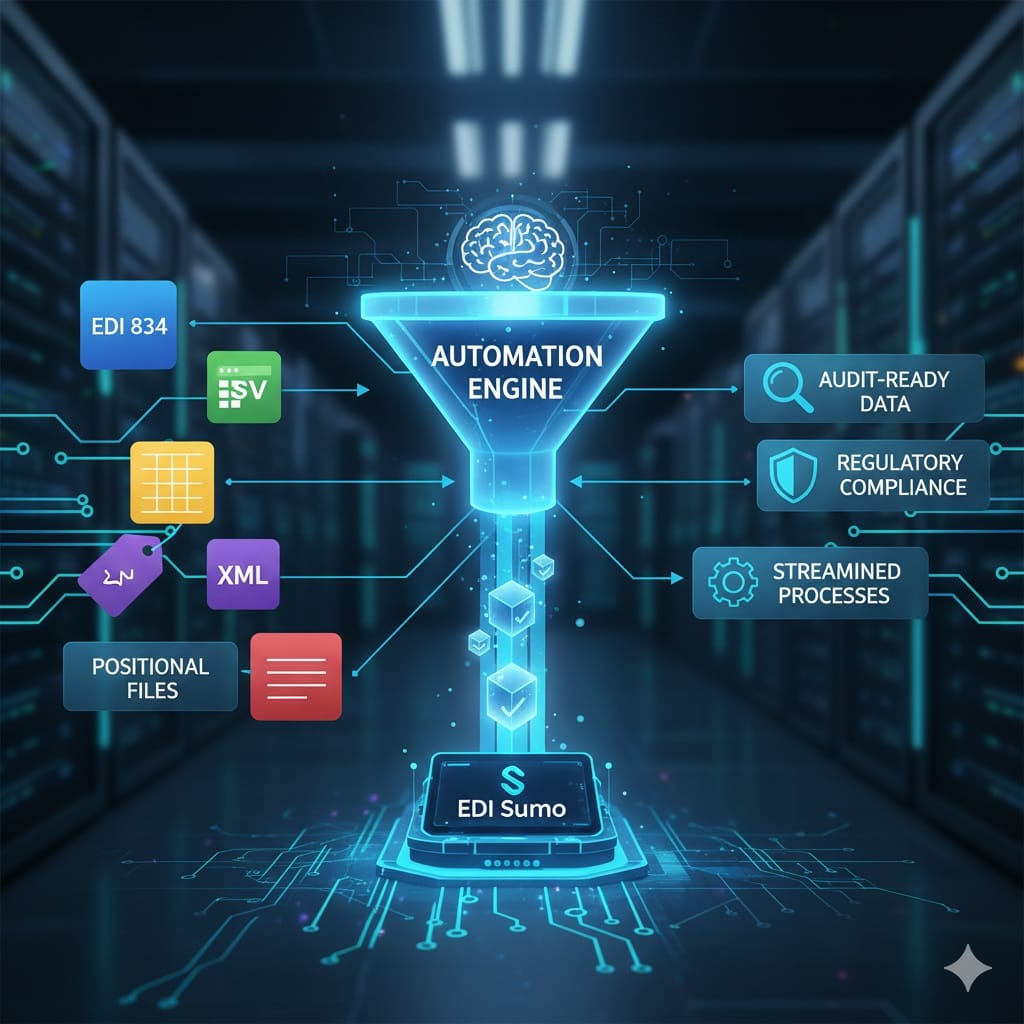
The fastest way to feed normalized eligibility (834) and claims (837) data into Guidewire is to use an automated EDI normalization layer that performs full SNIP validation, converts multi-format inputs (EDI, CSV, XML) into Guidewire-ready structures, and connects through pre-built APIs. Instead of building custom point-to-point scripts, a centralized validation and transformation platform reduces integration time from months to weeks while improving data quality and SLA performance.
Faster Guidewire Integration: The Case for Centralized EDI Normalization
For health insurers running Guidewire PolicyCenter or ClaimCenter, the bottleneck is rarely Guidewire itself — it is fragmented validation and normalization upstream. This guide covers the architecture, transaction requirements, and implementation framework that eliminate that bottleneck.
- Most Guidewire integration delays originate upstream: multiple formats, manual SNIP validation, custom mapping scripts, poor 999/277 visibility, and IT-dependent error handling.
- A centralized ingestion and normalization layer — applying automated SNIP Levels 1–7 — reduces deployment timelines from 3–6 months to 2–4 weeks depending on complexity.
- EDI 834 enrollment data must be fully normalized before Guidewire ingestion — un-normalized data multiplies downstream claims errors and customer service tickets.
- EDI 837 accuracy directly controls adjudication timelines, cash flow, denial rates, and regulatory compliance — fast ingestion without validation creates rework at every stage.
- EDI Sumo acts as the normalization and validation layer between trading partners and Guidewire, reducing EDI-related support tickets by up to 60%.
Why Traditional Guidewire EDI Integrations Slow Down
Traditional Guidewire EDI integration delays almost always occur before data ever reaches Guidewire. The root cause is upstream fragmentation — not a limitation of Guidewire itself.
- Multiple incoming formats from employers, TPAs, and clearinghouses, each requiring separate handling logic
- Manual or inconsistent SNIP validation that creates unpredictable error rates and testing cycles
- Custom mapping scripts built for each trading partner, accumulating maintenance debt with every new relationship
- Poor visibility into 999 and 277 acknowledgments, making it impossible to detect failures without manual log review
- Error handling that requires IT intervention for every exception, preventing business teams from resolving issues independently
What a Fast Guidewire Integration Architecture Looks Like
The fastest Guidewire integration model follows a five-layer architecture that centralizes ingestion, automates validation, normalizes output, and connects through reusable API patterns rather than custom per-partner scripts.
-
1Centralized ingestion layer
Accept EDI 834, 837, CSV, and XML from all trading partners in one place — eliminating the per-partner intake logic that fragments visibility and creates maintenance debt.
-
2Automated SNIP Level 1–7 validation
Catch syntax errors, HIPAA compliance violations, business rule failures, and payer-specific issues before data reaches Guidewire. When validation happens upstream, Guidewire receives only clean, compliant records.
-
3Normalized output transformation
Convert validated data into Guidewire-friendly JSON/XML formats aligned to PolicyCenter and ClaimCenter schemas — without rebuilding this transformation for each new trading partner.
-
4Pre-built Guidewire connectors or APIs
Use reusable integration patterns rather than custom scripts for each Guidewire module. This eliminates the most time-consuming part of traditional integration projects.
-
5Real-time monitoring and acknowledgment tracking
Correlate 999 and 277 responses to eligibility and claims data automatically. Surface failures immediately rather than discovering them during manual reconciliation cycles.
Typical deployment timeline using this architecture, compared to 3–6 months with traditional custom point-to-point integration approaches. Reduction comes from eliminating per-partner custom scripting and automating SNIP validation cycles.
Why 834 and 837 Normalization Is Non-Negotiable Before Guidewire Ingestion
Guidewire's PolicyCenter and ClaimCenter depend on clean, validated upstream data to function efficiently. Un-normalized 834 and 837 data does not cause a clean failure — it creates silent, cascading errors that surface much later as claim denials, eligibility mismatches, and compliance findings.
- Member eligibility status
- Coverage changes and effective dates
- Benefit updates and plan selections
- Dependent modifications and terminations
- Adjudication timelines and cash flow
- Denial rates and rework volumes
- Regulatory compliance and audit exposure
- Provider satisfaction and SLA performance
If 834 data is not normalized and fully SNIP-validated before Guidewire ingestion, downstream claims errors increase and customer service tickets multiply — because Guidewire is adjudicating against enrollment data it cannot trust. Fast 837 ingestion without automated validation creates rework at every subsequent stage. Fast ingestion with automated validation enables near real-time adjudication with minimal manual intervention.
SNIP Validation: Why Automation Is Non-Negotiable for Speed
Manual SNIP validation slows integration projects and introduces inconsistent error detection. Automated SNIP Levels 1–7 is the mechanism that makes fast Guidewire integration sustainable — not just at launch, but as trading partner volume and complexity grow.
| SNIP Level | What It Validates | Impact If Skipped |
|---|---|---|
| Level 1 — Syntax | Basic X12 structure and enveloping | Unparseable files reach Guidewire ingestion layer |
| Level 2 — Required Elements | Mandatory segments and fields present | Missing data causes PolicyCenter / ClaimCenter load failures |
| Level 3 — Balancing | Claim totals match service line sums | Arithmetic errors in adjudication data |
| Level 4 — Situational Rules | Conditional segments present when required | COB, secondary payer, and coordination logic fails |
| Level 5 — Code Sets | ICD-10, CPT, HCPCS, NPI validity | Invalid codes trigger denials or adjudication errors |
| Level 6 — Product Logic | Code-to-claim-type alignment | Institutional/professional claim mismatches |
| Level 7 — Payer Rules | Custom business logic and trading partner requirements | Payer-specific rejections after Guidewire ingestion |
The Role of 999 and 277 Acknowledgments in a Fast Integration
A fast Guidewire integration must also automate acknowledgment management. Without automated parsing and correlation of 999 and 277CA responses, teams waste hours reconciling claim status manually — erasing the speed gains achieved by upstream normalization.
- EDI 999 confirms receipt and syntax compliance at the file level — it tells you the file arrived and was structurally parseable, not that its content is valid for adjudication
- EDI 277CA tracks claim status throughout lifecycle events, providing claim-level acceptance or rejection with actionable error codes that identify the exact reason for failure
- Missing acknowledgments are a red flag requiring immediate follow-up — a file with no TA1 or 999 response may have failed transmission entirely and never entered processing
- Automated correlation of acknowledgment responses to originating files and trading partners enables real-time SLA tracking without manual log review
Step-by-Step: The Fastest Guidewire Integration Framework
This seven-step framework reflects the deployment sequence that consistently moves Guidewire integration timelines from 3–6 months to 2–4 weeks. Each step builds on the previous to eliminate the rework and testing cycles that extend traditional integration projects.
- Inventory all incoming trading partner formats — EDI, CSV, XML, positional — and map them to their source systems and delivery methods (SFTP, API, portal)
- Centralize ingestion into a normalization platform that accepts all formats through a single intake layer, eliminating per-partner custom handling
- Automate SNIP Level 1–7 validation across all transaction types before any data moves toward Guidewire
- Transform validated data into Guidewire-aligned formats using normalized output mappings for PolicyCenter and ClaimCenter schemas
- Activate pre-built API connectors to Guidewire rather than building custom point-to-point integration scripts
- Run parallel testing in a Guidewire sandbox environment using real trading partner data to validate end-to-end data flow before production activation
- Enable real-time monitoring and SLA alerts so issues are surfaced immediately rather than discovered during manual reconciliation or after provider escalation
Best Practices for Payer IT Leaders Managing Guidewire EDI Integration
- Validate before ingestion — not after errors surface. Every error caught upstream saves multiple correction cycles downstream in Guidewire.
- Avoid brittle point-to-point integrations. Custom scripts built for individual trading partners create maintenance debt that compounds with every new employer group or TPA relationship.
- Centralize visibility across eligibility and claims. IT and business teams should see the same real-time picture of what is moving through the pipeline — not siloed dashboards per transaction type.
- Automate acknowledgment management. 999 and 277CA monitoring should be systematic, not manual. Missing acknowledgments require immediate detection, not discovery during monthly reporting.
- Give business teams dashboard access to reduce IT dependency. Role-based access for enrollment managers, claims directors, and compliance teams eliminates the IT ticket queue that slows exception resolution.
Frequently Asked Questions: Guidewire EDI Integration
What is the fastest way to integrate 834 enrollment data into Guidewire?
How do SNIP levels impact Guidewire integration speed?
Why normalize 837 claims before Guidewire ingestion rather than after?
Can centralizing EDI normalization reduce the IT workload for Guidewire integrations?
What formats does EDI Sumo support for Guidewire integration projects?
Related Resources & Hub Pages
- Real-Time Integration for Healthcare Payers: Guidewire, IBM Sterling, and Data Lake
- WEDI SNIP Validation for 837 Claims: What Every Payer Team Needs to Know
- EDI 834 Enrollment Processing: Definition, Operational Challenges, and Resources Hub
- Trading Partner Scorecards: Using 999, TA1, and 277CA to Drive EDI File Quality
- EDI 837 Claim Rejections: Root Causes, Proven Fixes, and Clearinghouse Compliance
- EDI Sumo Integrations
- EDI Sumo Claims Management Solutions
Fewer Surprises. Faster Resolution. Smarter Guidewire Integration.
EDI Sumo provides the normalization, SNIP validation, and monitoring layer that eliminates upstream fragmentation and gets clean 834 and 837 data into Guidewire faster — without custom scripts or months-long deployment timelines.
Request a DemoReach us at info@edisumo.com or call 877-551-9050





.png)

.png)


.png)

